
Download Poster Banner Ads Maker – Create Stunning Ads with Poster Banner Ads Maker
Overview
Poster Banner Ads Maker is a desktop application designed to help users create visually compelling posters for advertising and promotional purposes. The software targets individuals and small businesses seeking to produce high-quality visual content without requiring advanced design skills. It is particularly useful for marketing professionals, social media managers, event organizers, and hobbyists who need to generate eye-catching banners for digital or print use.
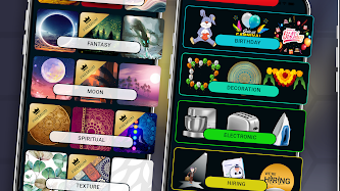
The tool supports a variety of use cases, including social media posts, event invitations, product promotions, and outdoor signage. With a focus on accessibility and ease of use, it enables users to craft professional-looking materials quickly. The application provides a library of customizable backgrounds and ready-to-use stickers, allowing for rapid content creation.
Users can also upload their own images to serve as base visuals, enhancing personalization. The developer did not provide additional information about the company or development background. The software is available for free, with no reported in-app purchases or subscription models.
Its primary purpose is to streamline the poster creation process through intuitive tools and pre-designed templates.
Key Features & Capabilities
- Pre-designed Backgrounds – Choose from a wide selection of professionally crafted backgrounds tailored for different themes such as food, electronics, and special events. These serve as a strong foundation for creating visually appealing posters.
- Customizable Stickers – Access a library of ready-to-use stickers that can be resized, repositioned, and layered to enhance the visual impact of posters. Themes include seasonal events, promotions, and lifestyle elements.
- Text Customization Tools – Modify text elements in terms of font, size, color, and alignment to match brand guidelines or creative preferences. This ensures that messaging is both legible and stylistically consistent.
- Image Upload Support – Import personal photos or graphics to use as background images or overlays, allowing for greater creative control and brand-specific content.
- High-Resolution Export – Save final designs in high resolution, suitable for both digital sharing and professional printing, ensuring clarity and quality across platforms.
These features collectively support efficient workflow for users who need to produce multiple posters in a short timeframe. For example, a small business owner could use the app to create a series of social media banners for a product launch by selecting a themed background, adding branded text, and inserting relevant stickers. Similarly, an event planner might design an invitation by uploading a personal photo, applying a festive sticker theme, and customizing the event details with readable fonts.
User Interface, Workflow & Performance
The user interface of Poster Banner Ads Maker is designed with simplicity and visual clarity in mind. Navigation is structured around a central canvas where users can view and edit their designs in real time. Tools are organized into clearly labeled panels, including a library of backgrounds, a sticker tray, and a text editor.
The layout supports drag-and-drop functionality, allowing users to place elements with minimal effort. Workflow efficiency is enhanced by the ability to preview changes instantly, reducing the need for trial-and-error adjustments. The application appears to prioritize responsiveness, with minimal lag during basic operations like resizing or repositioning elements.
However, exact performance details were not specified by the developer. Resource usage, including CPU and RAM behavior, remains undocumented. Stability during extended use or with large files has not been publicly reported.
General software behavior patterns suggest smooth operation under normal conditions, but users are advised to monitor performance based on their device specifications.
Compatibility & System Requirements
Poster Banner Ads Maker is available for Windows and Mac operating systems. The latest version is 1.0.2, released on March 15, 2025. The installation file size is 25.7 MB, indicating a lightweight application that should not consume significant disk space.
The developer did not specify exact system requirements, including minimum RAM, processor speed, or storage capacity. Compatibility information was partially provided, with no mention of specific versions of Windows or macOS. Users are encouraged to verify system compatibility with their device before installation.
The application does not appear to require an internet connection for core functionality, though certain features may depend on online resources. No cloud integration or synchronization features were mentioned in the available information.
Pros and Cons
Pros
- Intuitive interface suitable for beginners and non-designers
- Free to download and use with no hidden costs
- High-resolution export for print and digital sharing
- Wide variety of customizable stickers and backgrounds
- Supports personal image uploads for custom designs
Cons
- Exact system requirements were not listed
- No information on update frequency or support channels
- Performance under heavy usage remains unverified
- Limited customization options for advanced users
- Developer details not publicly available
FAQ Section
Is Poster Banner Ads Maker compatible with Windows and Mac?
Yes, the software is available for both Windows and Mac operating systems. The developer did not specify exact version requirements.
Is the software secure to download and use?
Poster Banner Ads Maker is reported as a free desktop application. While no security threats were mentioned, users should download from official sources to ensure integrity.
Does the app require an internet connection?
The core functionality appears to work offline. However, some features may rely on online resources, though this was not confirmed by the developer.
How often are updates released?
The latest version, 1.0.2, was released on March 15, 2025. The update frequency is not publicly documented.
Can I use the software for commercial purposes?
Yes, the application is free to use, and there are no restrictions mentioned regarding commercial use. Users are advised to review the end-user license agreement if available.
Final Thoughts
Poster Banner Ads Maker delivers a straightforward and accessible solution for creating professional-grade posters without the need for design expertise. Its combination of customizable backgrounds, stickers, and text tools enables users to produce visually engaging content for a wide range of applications. The free pricing model and lightweight file size make it an attractive option for individuals and small teams on a budget.
While some details like system requirements and update schedules are not fully disclosed, the software’s core functionality appears reliable and user-friendly. It stands out as a practical tool for marketers, event planners, and hobbyists who need to generate promotional materials quickly. For those seeking a simple, no-cost solution to design eye-catching banners, Poster Banner Ads Maker offers a compelling entry point.
Download Poster Banner Ads Maker now.





.png)

